
Milanote
Milanote
Visual workspace for creative projects with boards, cards, and mood boards for designers and creative professionals.
Key Features
- Visual boards
- Drag and drop
- Cards and columns
- Image boards
- Mood boards
- Task lists
- Comments
- File uploads
- Web clipper
- Templates
- Collaboration
- Mobile apps
- Offline mode
- Export
- Search
What is Milanote?
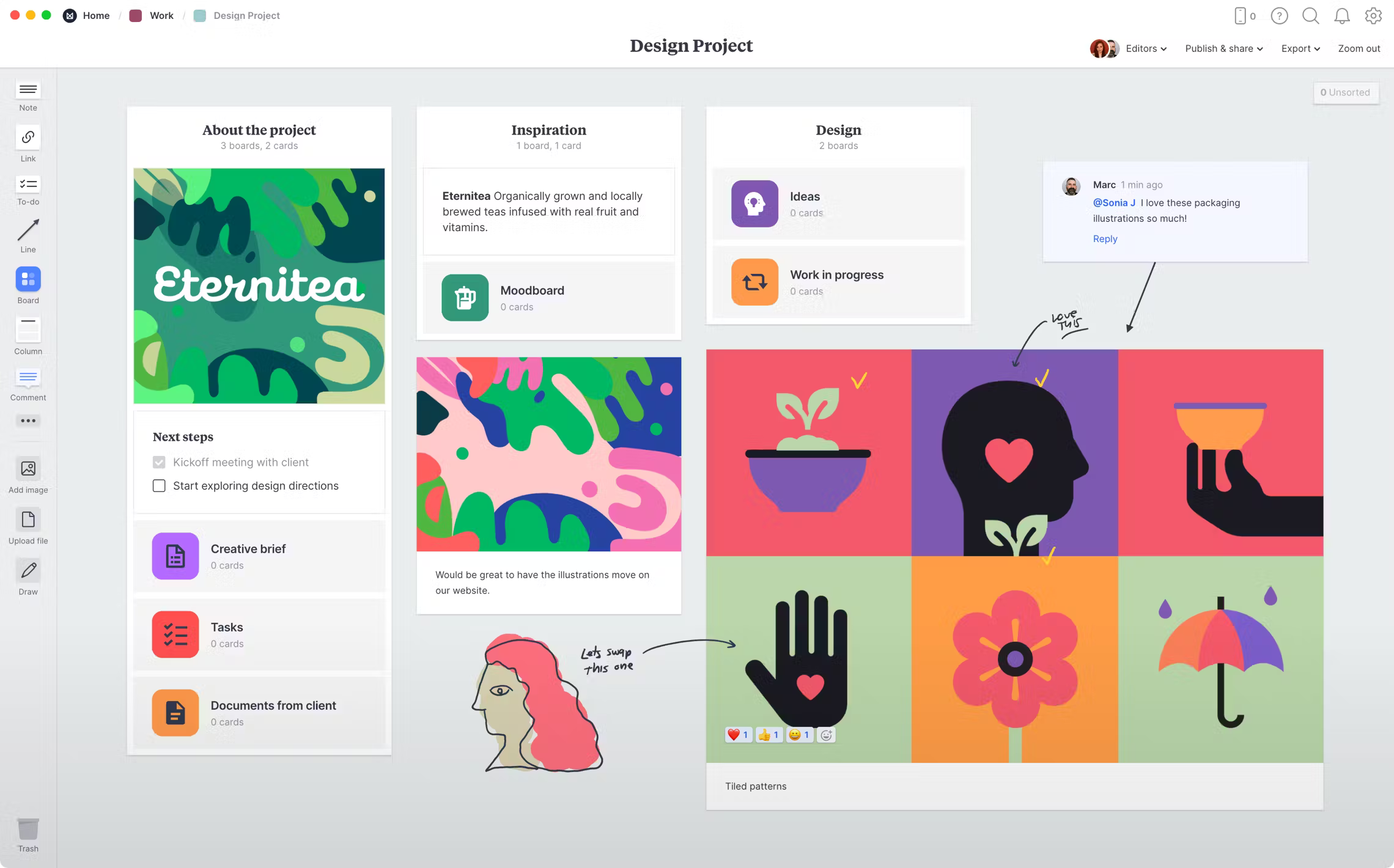
Milanote is a visual workspace designed specifically for creative professionals who need to organize ideas, projects, and inspiration in a flexible, intuitive environment. Unlike traditional note-taking apps that rely on linear documents or rigid databases, Milanote embraces a freeform canvas approach where you can arrange content spatially, just like working with physical materials on a desk or wall. This makes it particularly well-suited for designers, writers, marketers, and anyone whose work involves visual thinking and creative exploration.
At its core, Milanote functions as a digital corkboard where you can pin notes, images, links, files, and tasks in any arrangement that makes sense for your project. The interface is clean and uncluttered, focusing on your content rather than overwhelming you with features. You can create boards for different projects, nest boards within boards for organization, and connect related ideas visually. This spatial organization mirrors how creative professionals naturally think and work, making it feel more intuitive than traditional productivity tools.
What sets Milanote apart is its understanding of creative workflows. It includes features specifically designed for visual projects like mood boards, image collections, and design inspiration gathering. The built-in web clipper makes it easy to save references from across the internet, while the drag-and-drop interface ensures you can quickly rearrange and refine your ideas as projects evolve. Whether you're planning a brand identity, writing a novel, or organizing a marketing campaign, Milanote provides the flexibility to work in whatever way suits your creative process best.
Pros and Cons
Pros:
- Intuitive visual interface that feels natural for creative work
- Flexible freeform canvas allows unlimited spatial organization
- Excellent for mood boards and visual inspiration gathering
- Clean, distraction-free design that keeps focus on content
- Built-in web clipper for easy reference collection
- Supports multiple file types including images, PDFs, and documents
- Real-time collaboration features for team projects
- Generous free tier with 100 notes/images/files
- Works offline with automatic syncing when reconnected
- Mobile apps available for iOS and Android
- Pre-built templates for common creative workflows
- Nested boards allow for hierarchical project organization
- Fast performance even with image-heavy boards
Cons:
- Limited advanced features compared to comprehensive project management tools
- No database or table views for structured data
- Free tier limit of 100 items can be restrictive for larger projects
- Lacks advanced automation and integration capabilities
- No API for custom integrations or workflows
- Mobile experience is more limited than desktop version
- Can become cluttered without disciplined organization
- Export options are somewhat limited
- Not ideal for text-heavy documents or long-form writing
Who It's For
Milanote is perfectly suited for creative professionals who think visually and need a workspace that matches their natural workflow. Designers, art directors, photographers, and illustrators will find it invaluable for collecting inspiration, organizing mood boards, and planning visual projects. The ability to arrange images, color palettes, typography samples, and reference materials spatially makes it feel like a natural extension of the creative process. If you've ever worked with physical mood boards or pinned inspiration to a wall, Milanote will feel immediately familiar and intuitive.
Writers, content creators, and marketers also benefit significantly from Milanote's flexible approach. Whether you're outlining a novel, planning a content calendar, or developing a marketing campaign, the visual canvas allows you to see the big picture while diving into details. The ability to mix text notes with images, links, and files means you can keep all your research and planning in one place. Creative teams working on brand development, product launches, or editorial projects will appreciate the real-time collaboration features that keep everyone aligned without forcing rigid structures.
However, Milanote may not be the best fit for everyone. If you need advanced project management features, complex databases, or extensive automation, tools like Notion, Asana, or Monday.com might serve you better. Similarly, if your work is primarily text-based with minimal visual elements, or if you need detailed spreadsheets and data analysis, other tools would be more appropriate. Milanote excels in the creative planning and ideation phases but isn't designed to replace comprehensive project management or data management systems. It's best for those who value visual thinking and flexible organization over structured workflows and advanced features.
Visual Boards
Visual boards are the foundation of Milanote's approach to organization. Each board functions as an infinite canvas where you can place and arrange content freely, without being constrained by predetermined layouts or structures. You can create separate boards for different projects, clients, or areas of work, and switch between them effortlessly. The boards support zooming in and out, allowing you to work on fine details or step back to see the entire project at a glance. This spatial flexibility mirrors how creative professionals naturally organize physical materials, making the digital experience feel intuitive and natural.
What makes Milanote's boards particularly powerful is the ability to nest boards within boards, creating a hierarchical structure that can grow with your projects. You might have a main board for a brand identity project, with nested boards for logo concepts, color exploration, typography research, and application examples. Each nested board can be opened and worked on independently, yet remains connected to the parent board for easy navigation. This organizational flexibility means you can start simple and add complexity as needed, rather than being forced into a rigid structure from the beginning.
The visual nature of the boards makes them excellent for presenting ideas and progress to clients or team members. Instead of clicking through multiple documents or slides, you can simply share a board link that shows everything in context. Collaborators can see how different elements relate to each other spatially, comment on specific items, and understand the overall direction of the project at a glance. The boards maintain their visual integrity whether viewed on desktop or mobile, ensuring that your carefully arranged layouts look great regardless of how they're accessed.
Drag and Drop
The drag-and-drop interface is central to Milanote's user experience, making it incredibly easy to organize and reorganize your content. You can drag images directly from your desktop or browser onto a board, drop files from your file system, and rearrange everything with simple mouse movements. This tactile interaction feels natural and immediate, eliminating the friction that often comes with digital tools. Need to group related items? Just drag them together. Want to create a visual hierarchy? Resize and position elements until they feel right. The interface responds smoothly and predictably, making the organization process feel more like play than work.
Beyond basic positioning, the drag-and-drop functionality extends to creating connections and relationships between items. You can drag one board onto another to create nesting, drag items between boards to move them, and use the web clipper to drag content directly from websites into your workspace. This consistent interaction model means there's minimal learning curve—if you can drag something, you can organize it in Milanote. The system also includes smart alignment guides and snapping behavior that help keep your boards looking clean and organized without requiring pixel-perfect precision.
Mood Boards
Mood boards are where Milanote truly shines, offering a digital experience that captures the essence of physical mood board creation while adding digital conveniences. You can quickly gather images, color swatches, typography examples, and reference materials from across the web using the built-in clipper, then arrange them on your board to explore visual directions and establish aesthetic guidelines. The ability to resize images, overlap elements, and create visual groupings means you can craft mood boards that communicate tone, style, and direction effectively. Unlike physical mood boards, you can easily iterate, save multiple versions, and share them instantly with clients or team members.
The platform handles image-heavy boards with impressive performance, ensuring that even boards with dozens of high-resolution images remain responsive and quick to navigate. You can add notes and annotations to explain your thinking, attach color codes and specifications, and include links to source materials for reference. This makes mood boards in Milanote not just inspirational tools but practical working documents that can guide entire projects. The ability to nest mood boards within larger project boards means your inspiration and reference materials stay connected to the work they inform, creating a seamless workflow from concept to execution.
Templates
Milanote offers a curated collection of templates designed specifically for creative workflows, helping you get started quickly with proven structures. Templates cover common use cases like brand strategy, content planning, design briefs, project planning, and creative brainstorming. Each template provides a thoughtful starting point with suggested sections, placeholder content, and organizational patterns that you can customize to fit your specific needs. Rather than staring at a blank canvas, you can begin with a framework that guides your thinking while remaining flexible enough to adapt as your project evolves.
What makes these templates particularly valuable is that they're designed by and for creative professionals, reflecting real-world workflows rather than generic productivity patterns. You can use templates as-is, modify them extensively, or simply use them as inspiration for creating your own organizational systems. Once you've customized a template to your liking, you can reuse that structure for future projects, building your own library of workflows that match your specific working style. This balance between structure and flexibility helps teams establish consistent processes while maintaining the creative freedom that Milanote is known for.
Collaboration
Collaboration in Milanote is designed to feel natural and unobtrusive, allowing teams to work together without the complexity that often comes with collaborative tools. You can invite team members to specific boards, and everyone sees updates in real-time as changes are made. The commenting system lets you leave feedback on specific items rather than general board comments, making discussions contextual and actionable. Team members can add their own content, rearrange elements, and contribute to the creative process in a truly collaborative way. The visual nature of the boards means everyone can see the project's direction and progress at a glance, reducing the need for status meetings and lengthy explanations.
Permission controls allow you to share boards with different levels of access, from full editing rights to view-only access for clients or stakeholders. You can generate shareable links that work without requiring recipients to create accounts, making it easy to gather feedback from external collaborators. The activity feed keeps you informed of changes and comments without being overwhelming, and notifications can be customized to match your preferred level of engagement. For creative teams working on visual projects, this collaborative approach feels more natural than traditional document-based collaboration, as it mirrors the experience of working together around a physical table or wall.
Pricing
Milanote offers a straightforward pricing structure with two main tiers. The free plan is genuinely useful, providing up to 100 notes, images, or files—enough for personal projects, small freelance work, or trying out the platform thoroughly before committing. This limit applies to the total number of items across all your boards, so you'll need to be mindful of what you save, but for many users, especially those just starting out or working on a single project at a time, the free tier provides substantial value without any time restrictions.
The Pro plan costs $9.99 per month (or less with annual billing) and removes the 100-item limit, giving you unlimited notes, images, and files. This tier also includes unlimited file uploads, version history, and priority support. For professional creatives and teams who work on multiple projects simultaneously or need to maintain extensive reference libraries, the Pro plan is essential. The pricing is competitive compared to other creative tools, especially considering the unlimited storage for visual assets. There's also a team pricing option for organizations that need to manage multiple users with centralized billing and administration.
Verdict
Milanote succeeds brilliantly at what it sets out to do: provide a visual workspace that feels natural for creative professionals. Its freeform canvas approach, combined with thoughtful features like mood boards, web clipping, and nested organization, creates an environment where visual thinking can flourish. The interface is clean and intuitive, getting out of your way so you can focus on your creative work rather than wrestling with the tool. For designers, art directors, writers, and other creative professionals who think spatially and work with visual materials, Milanote offers a refreshing alternative to rigid productivity tools that force linear thinking.
The platform's limitations are worth noting but don't diminish its value for its intended audience. If you need advanced project management features, complex databases, or extensive integrations, you'll need to supplement Milanote with other tools or choose a more comprehensive platform. However, if your primary need is organizing creative work, gathering inspiration, and collaborating on visual projects, these limitations are unlikely to matter. The generous free tier makes it easy to try without commitment, and the affordable Pro pricing is reasonable for the value provided, especially for professionals who work extensively with visual materials.
Overall, Milanote earns a strong recommendation for its target audience. It understands creative workflows in a way that general-purpose productivity tools don't, and it executes its vision with polish and attention to detail. Whether you're planning a brand identity, organizing research for a writing project, or collaborating on a marketing campaign, Milanote provides the flexibility and visual focus that creative work demands. It's not trying to be everything to everyone, and that focused approach is precisely what makes it excellent at what it does. For creative professionals seeking a digital workspace that matches how they naturally think and work, Milanote is absolutely worth exploring.
Frequently Asked Questions about Milanote
What is Milanote?
Milanote is a visual workspace designed specifically for creative professionals who need to organize ideas, projects, and inspiration in a flexible, intuitive environment. Unlike traditional note-taking apps that rely on linear documents or rigid databases, Milanote embraces a freeform canvas approach where you can arrange content spatially, just like working with physical materials on a desk or wall. This makes it particularly well-suited for designers, writers, marketers, and anyone whose work involves visual thinking and creative exploration.
At its core, Milanote functions as a digital corkboard where you can pin notes, images, links, files, and tasks in any arrangement that makes sense for your project. The interface is clean and uncluttered, focusing on your content rather than overwhelming you with features. You can create boards for different projects, nest boards within boards for organization, and connect related ideas visually. This spatial organization mirrors how creative professionals naturally think and work, making it feel more intuitive than traditional productivity tools.
What sets Milanote apart is its understanding of creative workflows. It includes features specifically designed for visual projects like mood boards, image collections, and design inspiration gathering. The built-in web clipper makes it easy to save references from across the internet, while the drag-and-drop interface ensures you can quickly rearrange and refine your ideas as projects evolve. Whether you're planning a brand identity, writing a novel, or organizing a marketing campaign, Milanote provides the flexibility to work in whatever way suits your creative process best.
Pros and Cons
Pros:
- Intuitive visual interface that feels natural for creative work
- Flexible freeform canvas allows unlimited spatial organization
- Excellent for mood boards and visual inspiration gathering
- Clean, distraction-free design that keeps focus on content
- Built-in web clipper for easy reference collection
- Supports multiple file types including images, PDFs, and documents
- Real-time collaboration features for team projects
- Generous free tier with 100 notes/images/files
- Works offline with automatic syncing when reconnected
- Mobile apps available for iOS and Android
- Pre-built templates for common creative workflows
- Nested boards allow for hierarchical project organization
- Fast performance even with image-heavy boards
Cons:
- Limited advanced features compared to comprehensive project management tools
- No database or table views for structured data
- Free tier limit of 100 items can be restrictive for larger projects
- Lacks advanced automation and integration capabilities
- No API for custom integrations or workflows
- Mobile experience is more limited than desktop version
- Can become cluttered without disciplined organization
- Export options are somewhat limited
- Not ideal for text-heavy documents or long-form writing
Who It's For
Milanote is perfectly suited for creative professionals who think visually and need a workspace that matches their natural workflow. Designers, art directors, photographers, and illustrators will find it invaluable for collecting inspiration, organizing mood boards, and planning visual projects. The ability to arrange images, color palettes, typography samples, and reference materials spatially makes it feel like a natural extension of the creative process. If you've ever worked with physical mood boards or pinned inspiration to a wall, Milanote will feel immediately familiar and intuitive.
Writers, content creators, and marketers also benefit significantly from Milanote's flexible approach. Whether you're outlining a novel, planning a content calendar, or developing a marketing campaign, the visual canvas allows you to see the big picture while diving into details. The ability to mix text notes with images, links, and files means you can keep all your research and planning in one place. Creative teams working on brand development, product launches, or editorial projects will appreciate the real-time collaboration features that keep everyone aligned without forcing rigid structures.
However, Milanote may not be the best fit for everyone. If you need advanced project management features, complex databases, or extensive automation, tools like Notion, Asana, or Monday.com might serve you better. Similarly, if your work is primarily text-based with minimal visual elements, or if you need detailed spreadsheets and data analysis, other tools would be more appropriate. Milanote excels in the creative planning and ideation phases but isn't designed to replace comprehensive project management or data management systems. It's best for those who value visual thinking and flexible organization over structured workflows and advanced features.
Visual Boards
Visual boards are the foundation of Milanote's approach to organization. Each board functions as an infinite canvas where you can place and arrange content freely, without being constrained by predetermined layouts or structures. You can create separate boards for different projects, clients, or areas of work, and switch between them effortlessly. The boards support zooming in and out, allowing you to work on fine details or step back to see the entire project at a glance. This spatial flexibility mirrors how creative professionals naturally organize physical materials, making the digital experience feel intuitive and natural.
What makes Milanote's boards particularly powerful is the ability to nest boards within boards, creating a hierarchical structure that can grow with your projects. You might have a main board for a brand identity project, with nested boards for logo concepts, color exploration, typography research, and application examples. Each nested board can be opened and worked on independently, yet remains connected to the parent board for easy navigation. This organizational flexibility means you can start simple and add complexity as needed, rather than being forced into a rigid structure from the beginning.
The visual nature of the boards makes them excellent for presenting ideas and progress to clients or team members. Instead of clicking through multiple documents or slides, you can simply share a board link that shows everything in context. Collaborators can see how different elements relate to each other spatially, comment on specific items, and understand the overall direction of the project at a glance. The boards maintain their visual integrity whether viewed on desktop or mobile, ensuring that your carefully arranged layouts look great regardless of how they're accessed.
Drag and Drop
The drag-and-drop interface is central to Milanote's user experience, making it incredibly easy to organize and reorganize your content. You can drag images directly from your desktop or browser onto a board, drop files from your file system, and rearrange everything with simple mouse movements. This tactile interaction feels natural and immediate, eliminating the friction that often comes with digital tools. Need to group related items? Just drag them together. Want to create a visual hierarchy? Resize and position elements until they feel right. The interface responds smoothly and predictably, making the organization process feel more like play than work.
Beyond basic positioning, the drag-and-drop functionality extends to creating connections and relationships between items. You can drag one board onto another to create nesting, drag items between boards to move them, and use the web clipper to drag content directly from websites into your workspace. This consistent interaction model means there's minimal learning curve—if you can drag something, you can organize it in Milanote. The system also includes smart alignment guides and snapping behavior that help keep your boards looking clean and organized without requiring pixel-perfect precision.
Mood Boards
Mood boards are where Milanote truly shines, offering a digital experience that captures the essence of physical mood board creation while adding digital conveniences. You can quickly gather images, color swatches, typography examples, and reference materials from across the web using the built-in clipper, then arrange them on your board to explore visual directions and establish aesthetic guidelines. The ability to resize images, overlap elements, and create visual groupings means you can craft mood boards that communicate tone, style, and direction effectively. Unlike physical mood boards, you can easily iterate, save multiple versions, and share them instantly with clients or team members.
The platform handles image-heavy boards with impressive performance, ensuring that even boards with dozens of high-resolution images remain responsive and quick to navigate. You can add notes and annotations to explain your thinking, attach color codes and specifications, and include links to source materials for reference. This makes mood boards in Milanote not just inspirational tools but practical working documents that can guide entire projects. The ability to nest mood boards within larger project boards means your inspiration and reference materials stay connected to the work they inform, creating a seamless workflow from concept to execution.
Templates
Milanote offers a curated collection of templates designed specifically for creative workflows, helping you get started quickly with proven structures. Templates cover common use cases like brand strategy, content planning, design briefs, project planning, and creative brainstorming. Each template provides a thoughtful starting point with suggested sections, placeholder content, and organizational patterns that you can customize to fit your specific needs. Rather than staring at a blank canvas, you can begin with a framework that guides your thinking while remaining flexible enough to adapt as your project evolves.
What makes these templates particularly valuable is that they're designed by and for creative professionals, reflecting real-world workflows rather than generic productivity patterns. You can use templates as-is, modify them extensively, or simply use them as inspiration for creating your own organizational systems. Once you've customized a template to your liking, you can reuse that structure for future projects, building your own library of workflows that match your specific working style. This balance between structure and flexibility helps teams establish consistent processes while maintaining the creative freedom that Milanote is known for.
Collaboration
Collaboration in Milanote is designed to feel natural and unobtrusive, allowing teams to work together without the complexity that often comes with collaborative tools. You can invite team members to specific boards, and everyone sees updates in real-time as changes are made. The commenting system lets you leave feedback on specific items rather than general board comments, making discussions contextual and actionable. Team members can add their own content, rearrange elements, and contribute to the creative process in a truly collaborative way. The visual nature of the boards means everyone can see the project's direction and progress at a glance, reducing the need for status meetings and lengthy explanations.
Permission controls allow you to share boards with different levels of access, from full editing rights to view-only access for clients or stakeholders. You can generate shareable links that work without requiring recipients to create accounts, making it easy to gather feedback from external collaborators. The activity feed keeps you informed of changes and comments without being overwhelming, and notifications can be customized to match your preferred level of engagement. For creative teams working on visual projects, this collaborative approach feels more natural than traditional document-based collaboration, as it mirrors the experience of working together around a physical table or wall.
Pricing
Milanote offers a straightforward pricing structure with two main tiers. The free plan is genuinely useful, providing up to 100 notes, images, or files—enough for personal projects, small freelance work, or trying out the platform thoroughly before committing. This limit applies to the total number of items across all your boards, so you'll need to be mindful of what you save, but for many users, especially those just starting out or working on a single project at a time, the free tier provides substantial value without any time restrictions.
The Pro plan costs $9.99 per month (or less with annual billing) and removes the 100-item limit, giving you unlimited notes, images, and files. This tier also includes unlimited file uploads, version history, and priority support. For professional creatives and teams who work on multiple projects simultaneously or need to maintain extensive reference libraries, the Pro plan is essential. The pricing is competitive compared to other creative tools, especially considering the unlimited storage for visual assets. There's also a team pricing option for organizations that need to manage multiple users with centralized billing and administration.
Verdict
Milanote succeeds brilliantly at what it sets out to do: provide a visual workspace that feels natural for creative professionals. Its freeform canvas approach, combined with thoughtful features like mood boards, web clipping, and nested organization, creates an environment where visual thinking can flourish. The interface is clean and intuitive, getting out of your way so you can focus on your creative work rather than wrestling with the tool. For designers, art directors, writers, and other creative professionals who think spatially and work with visual materials, Milanote offers a refreshing alternative to rigid productivity tools that force linear thinking.
The platform's limitations are worth noting but don't diminish its value for its intended audience. If you need advanced project management features, complex databases, or extensive integrations, you'll need to supplement Milanote with other tools or choose a more comprehensive platform. However, if your primary need is organizing creative work, gathering inspiration, and collaborating on visual projects, these limitations are unlikely to matter. The generous free tier makes it easy to try without commitment, and the affordable Pro pricing is reasonable for the value provided, especially for professionals who work extensively with visual materials.
Overall, Milanote earns a strong recommendation for its target audience. It understands creative workflows in a way that general-purpose productivity tools don't, and it executes its vision with polish and attention to detail. Whether you're planning a brand identity, organizing research for a writing project, or collaborating on a marketing campaign, Milanote provides the flexibility and visual focus that creative work demands. It's not trying to be everything to everyone, and that focused approach is precisely what makes it excellent at what it does. For creative professionals seeking a digital workspace that matches how they naturally think and work, Milanote is absolutely worth exploring.