GoodNotes
GoodNotes
Digital notebook for iPad and Mac with handwriting recognition, PDF annotation, and Apple Pencil support for students.
Key Features
- Handwriting recognition
- PDF annotation
- Apple Pencil support
- Notebooks
- Templates
- Shape recognition
- Text boxes
- Image insertion
- Audio recording
- Search handwriting
- iCloud sync
- Folders
- Export options
- Presentation mode
- Study sets
What is GoodNotes?
GoodNotes is a premium digital note-taking application designed specifically for Apple devices, including iPad, iPhone, and Mac. It transforms your device into a powerful digital notebook that combines the natural feel of handwriting with the convenience and organization of digital tools. With its intuitive interface and robust feature set, GoodNotes has become one of the most popular note-taking apps among students, professionals, and creative individuals who want to go paperless without sacrificing the tactile experience of writing by hand.
At its core, GoodNotes excels at handwriting recognition, allowing users to write naturally with an Apple Pencil or stylus and then search through their handwritten notes as if they were typed text. The app supports unlimited notebooks, each customizable with different paper styles, covers, and organizational structures. Beyond basic note-taking, GoodNotes serves as a comprehensive PDF annotation tool, making it invaluable for students reviewing lecture slides, professionals marking up documents, and anyone who needs to interact with digital documents in a meaningful way.
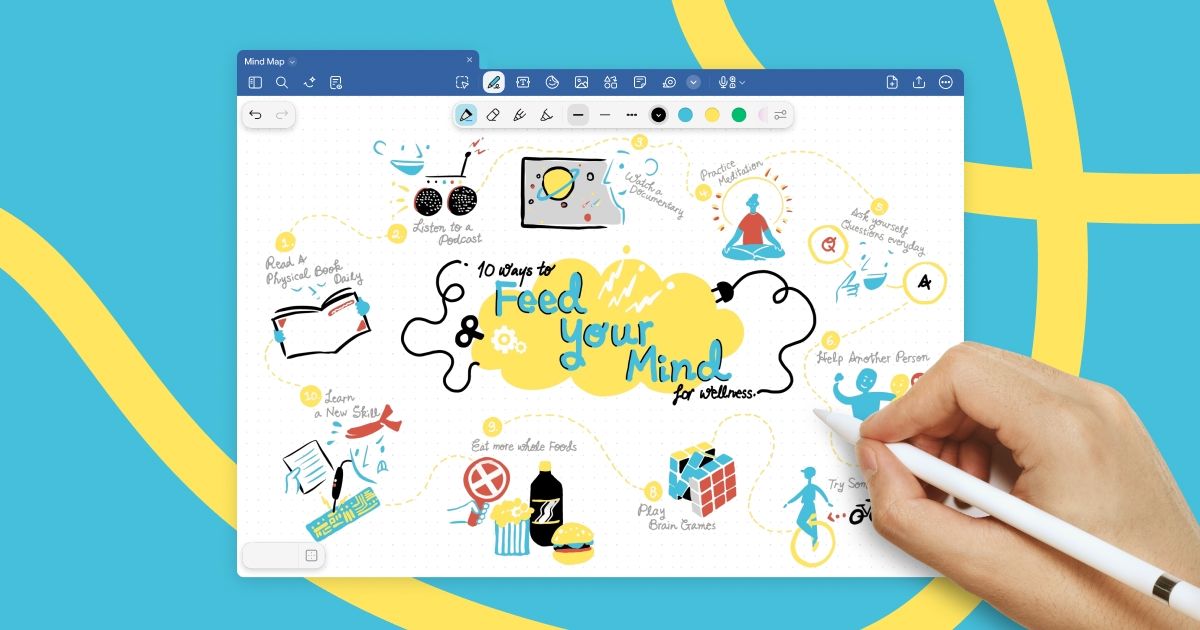
What sets GoodNotes apart is its attention to detail and user experience. The app includes features like shape recognition that automatically straightens your hand-drawn shapes, audio recording synchronized with your notes, and seamless iCloud sync across all your Apple devices. Whether you're taking lecture notes, sketching ideas, annotating research papers, or planning projects, GoodNotes provides a flexible digital workspace that adapts to your workflow while maintaining the natural feel of pen and paper.
Pros and Cons
Pros:
- Excellent handwriting recognition that makes handwritten notes searchable
- Seamless Apple Pencil integration with palm rejection and pressure sensitivity
- Powerful PDF annotation tools for marking up documents and textbooks
- Automatic shape recognition for clean diagrams and illustrations
- iCloud sync keeps notes synchronized across all Apple devices
- Extensive template library for different note-taking styles and purposes
- Audio recording feature syncs recordings with your handwritten notes
- Intuitive folder organization system for managing multiple notebooks
- Multiple export options including PDF, image, and GoodNotes format
- Presentation mode for displaying notes during meetings or lectures
- Study sets feature with flashcards and spaced repetition for learning
- Regular updates with new features and improvements
- Clean, user-friendly interface that's easy to learn and navigate
- Affordable pricing with one-time purchase option and reasonable subscription
Cons:
- Limited to Apple ecosystem only - no Android or Windows support
- No real-time collaboration features for working with others
- Some advanced features require premium subscription
- Can be resource-intensive on older iPad models
- Learning curve for utilizing all advanced features effectively
- Limited customization options for pen styles and colors compared to competitors
- No web-based version for accessing notes from non-Apple devices
Who It's For
GoodNotes is ideal for students at all levels, from high school to graduate school and beyond. The app's handwriting recognition and PDF annotation capabilities make it perfect for taking lecture notes, annotating textbooks and research papers, and organizing study materials. The new study sets feature with flashcards and spaced repetition helps students actively engage with their material and improve retention. Students who want to reduce their paper load while maintaining the benefits of handwriting for memory and comprehension will find GoodNotes to be an invaluable study companion.
Professionals across various industries will appreciate GoodNotes for meeting notes, document review, and project planning. Business professionals can annotate contracts and presentations, designers can sketch concepts and mood boards, and educators can prepare lesson plans and grade assignments. The presentation mode makes it easy to share notes during meetings, while the audio recording feature ensures you never miss important details. Anyone who attends frequent meetings or needs to review and mark up documents will benefit from GoodNotes' organizational capabilities and seamless sync across devices.
Creative individuals, including artists, writers, and planners, will find GoodNotes to be a versatile digital canvas. The app's shape recognition and drawing tools make it suitable for sketching, bullet journaling, and visual note-taking. The extensive template library includes options for planners, journals, music sheets, and more, making it easy to customize your digital workspace. However, it's important to note that GoodNotes is exclusively for Apple users - if you're not invested in the Apple ecosystem or need cross-platform compatibility, you'll need to consider alternative solutions.
Handwriting Recognition
GoodNotes features one of the most advanced handwriting recognition systems available in any note-taking app. The technology works in the background, automatically converting your handwritten text into searchable content without requiring any manual conversion. This means you can write naturally with your Apple Pencil, and later search through thousands of pages of handwritten notes just by typing keywords. The recognition engine is remarkably accurate, even with cursive writing or less-than-perfect handwriting, and it supports multiple languages including English, Chinese, Japanese, Korean, and many European languages.
The practical applications of this feature are enormous. Students can quickly find specific topics or concepts across all their lecture notes from an entire semester. Professionals can locate important details from meeting notes taken months ago. The handwriting recognition also enables the lasso tool to select handwritten text and convert it to typed text, which is useful when you need to copy notes into emails or documents. This seamless bridge between handwriting and digital text is what makes GoodNotes feel like the best of both worlds - the cognitive benefits of handwriting combined with the searchability and organization of digital notes.
PDF Annotation
PDF annotation is one of GoodNotes' standout features, transforming the app into a powerful document markup tool. You can import PDFs of any size - from single-page forms to 500-page textbooks - and annotate them with handwriting, highlighting, text boxes, and shapes. The app maintains the original PDF structure while adding your annotations as a layer on top, so you can always export a clean version or a marked-up version. This makes it perfect for students annotating lecture slides and textbooks, lawyers reviewing contracts, teachers grading assignments, or anyone who needs to provide feedback on documents.
The annotation tools are comprehensive and intuitive. You can highlight text in multiple colors, add handwritten notes in margins, insert text boxes for typed comments, draw arrows and shapes to emphasize points, and even add images or additional pages to the PDF. The eraser tool lets you remove annotations without affecting the underlying PDF, and the undo/redo functionality gives you confidence to mark up documents freely. GoodNotes also supports hyperlinks within PDFs, making it easy to navigate large documents. For students and professionals who work extensively with PDF documents, GoodNotes essentially replaces the need for printing, marking up by hand, and scanning - saving time, money, and paper.
Apple Pencil Support
GoodNotes is optimized for the Apple Pencil, offering one of the most natural and responsive writing experiences available on iPad. The app takes full advantage of the Apple Pencil's pressure sensitivity and tilt recognition, allowing for varied line weights and shading effects that mimic real pen and paper. Palm rejection technology works flawlessly, so you can rest your hand on the screen while writing without creating unwanted marks. The low latency between the pencil tip and the digital ink appearing on screen creates a remarkably paper-like feel that makes extended writing sessions comfortable and natural.
The integration extends to the Apple Pencil's hardware features as well. Double-tap on the Apple Pencil 2 to quickly switch between your pen and eraser, or customize this gesture to switch between tools, colors, or activate the lasso tool. The app also supports the Apple Pencil's hover feature on compatible iPad Pro models, showing a preview of where your mark will appear before the pencil touches the screen. While GoodNotes works with other styluses and even finger input, the experience is truly optimized for Apple Pencil users. If you own an iPad and Apple Pencil, GoodNotes is designed to make the most of this hardware combination, delivering a premium digital writing experience.
Templates
GoodNotes includes an extensive library of templates that cater to virtually every note-taking need and style. The built-in templates range from basic lined and graph paper to specialized formats like Cornell notes, music staff paper, weekly planners, habit trackers, and storyboard layouts. Each template is professionally designed and can be customized with different paper colors and cover designs. You can also create custom templates by designing your own page layouts or importing templates created by the GoodNotes community, giving you unlimited flexibility in how you structure your digital notebooks.
The template system makes GoodNotes versatile enough to serve multiple purposes. Students can use Cornell note templates for structured lecture notes, graph paper for math and science problems, and blank pages for sketching diagrams. Professionals might use meeting note templates, project planning layouts, or daily planner pages. Creative users can access bullet journal templates, habit trackers, and artistic layouts. The ability to mix different templates within the same notebook means you're not locked into one format - you can have lined pages for text notes, blank pages for sketches, and planner pages for scheduling all in one organized notebook. This flexibility is one reason GoodNotes appeals to such a wide range of users.
Study Sets
Study Sets is a relatively new feature in GoodNotes that transforms the app from a passive note-taking tool into an active learning platform. This feature allows you to create digital flashcards directly from your notes, complete with text, images, and even handwritten content. The flashcards support spaced repetition, a scientifically-proven learning technique that shows you cards at optimal intervals to maximize retention and minimize study time. You can create study sets manually or generate them from your existing notes, making it easy to turn your lecture notes into effective study materials.
The Study Sets feature includes multiple study modes to accommodate different learning styles. You can flip through cards in order or shuffle them for varied practice, mark cards as mastered to focus on challenging material, and track your progress over time. The integration with your GoodNotes notebooks means your study materials are always connected to your source notes - you can jump from a flashcard back to the relevant page in your notebook for more context. For students preparing for exams or anyone trying to memorize information, Study Sets adds significant value to GoodNotes, making it a more comprehensive learning tool rather than just a place to store notes.
Pricing
GoodNotes offers a generous free version that includes all the core note-taking features, making it accessible to users who want to try the app before committing financially. The free tier allows you to create up to three notebooks, use basic templates, and access fundamental features like handwriting recognition, PDF annotation, and Apple Pencil support. This is sufficient for casual users or those who want to evaluate whether GoodNotes fits their workflow before upgrading.
For users who need unlimited notebooks and access to premium features, GoodNotes Premium is available for $9.99 per year. This subscription unlocks unlimited notebooks, the full template library, Study Sets with spaced repetition, advanced customization options, and priority access to new features. The annual subscription model is notably affordable compared to competitors, especially considering the depth of features included. GoodNotes previously offered a one-time purchase option, and users who purchased that version still have access to the app, though new users are directed to the subscription model. At under $10 per year, GoodNotes Premium represents excellent value for students and professionals who rely on digital note-taking daily.
Verdict
GoodNotes stands as one of the premier note-taking applications for Apple devices, and for good reason. It successfully bridges the gap between traditional handwriting and digital convenience, offering a natural writing experience that doesn't sacrifice the organizational and search capabilities that make digital notes so powerful. The handwriting recognition is industry-leading, the PDF annotation tools are comprehensive, and the Apple Pencil integration is seamless. For students, professionals, and creative individuals invested in the Apple ecosystem, GoodNotes delivers exceptional value and functionality that can genuinely transform how you work with information.
The app's main limitation is its exclusivity to Apple devices, which rules it out for anyone who needs cross-platform compatibility or uses Android or Windows devices. Additionally, the lack of real-time collaboration features means it's not ideal for team projects or shared note-taking. However, for individual users who own an iPad and Apple Pencil, these limitations are unlikely to be deal-breakers. The recent addition of Study Sets adds even more value, particularly for students, making GoodNotes not just a note repository but an active learning tool.
Overall, GoodNotes earns its reputation as a top-tier note-taking app. The combination of powerful features, intuitive design, and affordable pricing makes it an excellent investment for anyone serious about digital note-taking. Whether you're a student looking to go paperless, a professional who needs to annotate documents regularly, or someone who simply wants a better way to organize their thoughts and ideas, GoodNotes delivers a polished, reliable experience that's worth every penny of its modest subscription fee. If you're in the Apple ecosystem and haven't tried GoodNotes yet, the free version offers a perfect opportunity to discover what you've been missing.
Frequently Asked Questions about GoodNotes
What is GoodNotes?
GoodNotes is a premium digital note-taking application designed specifically for Apple devices, including iPad, iPhone, and Mac. It transforms your device into a powerful digital notebook that combines the natural feel of handwriting with the convenience and organization of digital tools. With its intuitive interface and robust feature set, GoodNotes has become one of the most popular note-taking apps among students, professionals, and creative individuals who want to go paperless without sacrificing the tactile experience of writing by hand.
At its core, GoodNotes excels at handwriting recognition, allowing users to write naturally with an Apple Pencil or stylus and then search through their handwritten notes as if they were typed text. The app supports unlimited notebooks, each customizable with different paper styles, covers, and organizational structures. Beyond basic note-taking, GoodNotes serves as a comprehensive PDF annotation tool, making it invaluable for students reviewing lecture slides, professionals marking up documents, and anyone who needs to interact with digital documents in a meaningful way.
What sets GoodNotes apart is its attention to detail and user experience. The app includes features like shape recognition that automatically straightens your hand-drawn shapes, audio recording synchronized with your notes, and seamless iCloud sync across all your Apple devices. Whether you're taking lecture notes, sketching ideas, annotating research papers, or planning projects, GoodNotes provides a flexible digital workspace that adapts to your workflow while maintaining the natural feel of pen and paper.
Pros and Cons
Pros:
- Excellent handwriting recognition that makes handwritten notes searchable
- Seamless Apple Pencil integration with palm rejection and pressure sensitivity
- Powerful PDF annotation tools for marking up documents and textbooks
- Automatic shape recognition for clean diagrams and illustrations
- iCloud sync keeps notes synchronized across all Apple devices
- Extensive template library for different note-taking styles and purposes
- Audio recording feature syncs recordings with your handwritten notes
- Intuitive folder organization system for managing multiple notebooks
- Multiple export options including PDF, image, and GoodNotes format
- Presentation mode for displaying notes during meetings or lectures
- Study sets feature with flashcards and spaced repetition for learning
- Regular updates with new features and improvements
- Clean, user-friendly interface that's easy to learn and navigate
- Affordable pricing with one-time purchase option and reasonable subscription
Cons:
- Limited to Apple ecosystem only - no Android or Windows support
- No real-time collaboration features for working with others
- Some advanced features require premium subscription
- Can be resource-intensive on older iPad models
- Learning curve for utilizing all advanced features effectively
- Limited customization options for pen styles and colors compared to competitors
- No web-based version for accessing notes from non-Apple devices
Who It's For
GoodNotes is ideal for students at all levels, from high school to graduate school and beyond. The app's handwriting recognition and PDF annotation capabilities make it perfect for taking lecture notes, annotating textbooks and research papers, and organizing study materials. The new study sets feature with flashcards and spaced repetition helps students actively engage with their material and improve retention. Students who want to reduce their paper load while maintaining the benefits of handwriting for memory and comprehension will find GoodNotes to be an invaluable study companion.
Professionals across various industries will appreciate GoodNotes for meeting notes, document review, and project planning. Business professionals can annotate contracts and presentations, designers can sketch concepts and mood boards, and educators can prepare lesson plans and grade assignments. The presentation mode makes it easy to share notes during meetings, while the audio recording feature ensures you never miss important details. Anyone who attends frequent meetings or needs to review and mark up documents will benefit from GoodNotes' organizational capabilities and seamless sync across devices.
Creative individuals, including artists, writers, and planners, will find GoodNotes to be a versatile digital canvas. The app's shape recognition and drawing tools make it suitable for sketching, bullet journaling, and visual note-taking. The extensive template library includes options for planners, journals, music sheets, and more, making it easy to customize your digital workspace. However, it's important to note that GoodNotes is exclusively for Apple users - if you're not invested in the Apple ecosystem or need cross-platform compatibility, you'll need to consider alternative solutions.
Handwriting Recognition
GoodNotes features one of the most advanced handwriting recognition systems available in any note-taking app. The technology works in the background, automatically converting your handwritten text into searchable content without requiring any manual conversion. This means you can write naturally with your Apple Pencil, and later search through thousands of pages of handwritten notes just by typing keywords. The recognition engine is remarkably accurate, even with cursive writing or less-than-perfect handwriting, and it supports multiple languages including English, Chinese, Japanese, Korean, and many European languages.
The practical applications of this feature are enormous. Students can quickly find specific topics or concepts across all their lecture notes from an entire semester. Professionals can locate important details from meeting notes taken months ago. The handwriting recognition also enables the lasso tool to select handwritten text and convert it to typed text, which is useful when you need to copy notes into emails or documents. This seamless bridge between handwriting and digital text is what makes GoodNotes feel like the best of both worlds - the cognitive benefits of handwriting combined with the searchability and organization of digital notes.
PDF Annotation
PDF annotation is one of GoodNotes' standout features, transforming the app into a powerful document markup tool. You can import PDFs of any size - from single-page forms to 500-page textbooks - and annotate them with handwriting, highlighting, text boxes, and shapes. The app maintains the original PDF structure while adding your annotations as a layer on top, so you can always export a clean version or a marked-up version. This makes it perfect for students annotating lecture slides and textbooks, lawyers reviewing contracts, teachers grading assignments, or anyone who needs to provide feedback on documents.
The annotation tools are comprehensive and intuitive. You can highlight text in multiple colors, add handwritten notes in margins, insert text boxes for typed comments, draw arrows and shapes to emphasize points, and even add images or additional pages to the PDF. The eraser tool lets you remove annotations without affecting the underlying PDF, and the undo/redo functionality gives you confidence to mark up documents freely. GoodNotes also supports hyperlinks within PDFs, making it easy to navigate large documents. For students and professionals who work extensively with PDF documents, GoodNotes essentially replaces the need for printing, marking up by hand, and scanning - saving time, money, and paper.
Apple Pencil Support
GoodNotes is optimized for the Apple Pencil, offering one of the most natural and responsive writing experiences available on iPad. The app takes full advantage of the Apple Pencil's pressure sensitivity and tilt recognition, allowing for varied line weights and shading effects that mimic real pen and paper. Palm rejection technology works flawlessly, so you can rest your hand on the screen while writing without creating unwanted marks. The low latency between the pencil tip and the digital ink appearing on screen creates a remarkably paper-like feel that makes extended writing sessions comfortable and natural.
The integration extends to the Apple Pencil's hardware features as well. Double-tap on the Apple Pencil 2 to quickly switch between your pen and eraser, or customize this gesture to switch between tools, colors, or activate the lasso tool. The app also supports the Apple Pencil's hover feature on compatible iPad Pro models, showing a preview of where your mark will appear before the pencil touches the screen. While GoodNotes works with other styluses and even finger input, the experience is truly optimized for Apple Pencil users. If you own an iPad and Apple Pencil, GoodNotes is designed to make the most of this hardware combination, delivering a premium digital writing experience.
Templates
GoodNotes includes an extensive library of templates that cater to virtually every note-taking need and style. The built-in templates range from basic lined and graph paper to specialized formats like Cornell notes, music staff paper, weekly planners, habit trackers, and storyboard layouts. Each template is professionally designed and can be customized with different paper colors and cover designs. You can also create custom templates by designing your own page layouts or importing templates created by the GoodNotes community, giving you unlimited flexibility in how you structure your digital notebooks.
The template system makes GoodNotes versatile enough to serve multiple purposes. Students can use Cornell note templates for structured lecture notes, graph paper for math and science problems, and blank pages for sketching diagrams. Professionals might use meeting note templates, project planning layouts, or daily planner pages. Creative users can access bullet journal templates, habit trackers, and artistic layouts. The ability to mix different templates within the same notebook means you're not locked into one format - you can have lined pages for text notes, blank pages for sketches, and planner pages for scheduling all in one organized notebook. This flexibility is one reason GoodNotes appeals to such a wide range of users.
Study Sets
Study Sets is a relatively new feature in GoodNotes that transforms the app from a passive note-taking tool into an active learning platform. This feature allows you to create digital flashcards directly from your notes, complete with text, images, and even handwritten content. The flashcards support spaced repetition, a scientifically-proven learning technique that shows you cards at optimal intervals to maximize retention and minimize study time. You can create study sets manually or generate them from your existing notes, making it easy to turn your lecture notes into effective study materials.
The Study Sets feature includes multiple study modes to accommodate different learning styles. You can flip through cards in order or shuffle them for varied practice, mark cards as mastered to focus on challenging material, and track your progress over time. The integration with your GoodNotes notebooks means your study materials are always connected to your source notes - you can jump from a flashcard back to the relevant page in your notebook for more context. For students preparing for exams or anyone trying to memorize information, Study Sets adds significant value to GoodNotes, making it a more comprehensive learning tool rather than just a place to store notes.
Pricing
GoodNotes offers a generous free version that includes all the core note-taking features, making it accessible to users who want to try the app before committing financially. The free tier allows you to create up to three notebooks, use basic templates, and access fundamental features like handwriting recognition, PDF annotation, and Apple Pencil support. This is sufficient for casual users or those who want to evaluate whether GoodNotes fits their workflow before upgrading.
For users who need unlimited notebooks and access to premium features, GoodNotes Premium is available for $9.99 per year. This subscription unlocks unlimited notebooks, the full template library, Study Sets with spaced repetition, advanced customization options, and priority access to new features. The annual subscription model is notably affordable compared to competitors, especially considering the depth of features included. GoodNotes previously offered a one-time purchase option, and users who purchased that version still have access to the app, though new users are directed to the subscription model. At under $10 per year, GoodNotes Premium represents excellent value for students and professionals who rely on digital note-taking daily.
Verdict
GoodNotes stands as one of the premier note-taking applications for Apple devices, and for good reason. It successfully bridges the gap between traditional handwriting and digital convenience, offering a natural writing experience that doesn't sacrifice the organizational and search capabilities that make digital notes so powerful. The handwriting recognition is industry-leading, the PDF annotation tools are comprehensive, and the Apple Pencil integration is seamless. For students, professionals, and creative individuals invested in the Apple ecosystem, GoodNotes delivers exceptional value and functionality that can genuinely transform how you work with information.
The app's main limitation is its exclusivity to Apple devices, which rules it out for anyone who needs cross-platform compatibility or uses Android or Windows devices. Additionally, the lack of real-time collaboration features means it's not ideal for team projects or shared note-taking. However, for individual users who own an iPad and Apple Pencil, these limitations are unlikely to be deal-breakers. The recent addition of Study Sets adds even more value, particularly for students, making GoodNotes not just a note repository but an active learning tool.
Overall, GoodNotes earns its reputation as a top-tier note-taking app. The combination of powerful features, intuitive design, and affordable pricing makes it an excellent investment for anyone serious about digital note-taking. Whether you're a student looking to go paperless, a professional who needs to annotate documents regularly, or someone who simply wants a better way to organize their thoughts and ideas, GoodNotes delivers a polished, reliable experience that's worth every penny of its modest subscription fee. If you're in the Apple ecosystem and haven't tried GoodNotes yet, the free version offers a perfect opportunity to discover what you've been missing.